|
|
 | J.G. Island Chess Moremovers - Useful tricks |
- Problem description from yacpdb or pdb (id, author name, year, fen, links) can be copy-pasted in a single operation into the J.G.Island window.
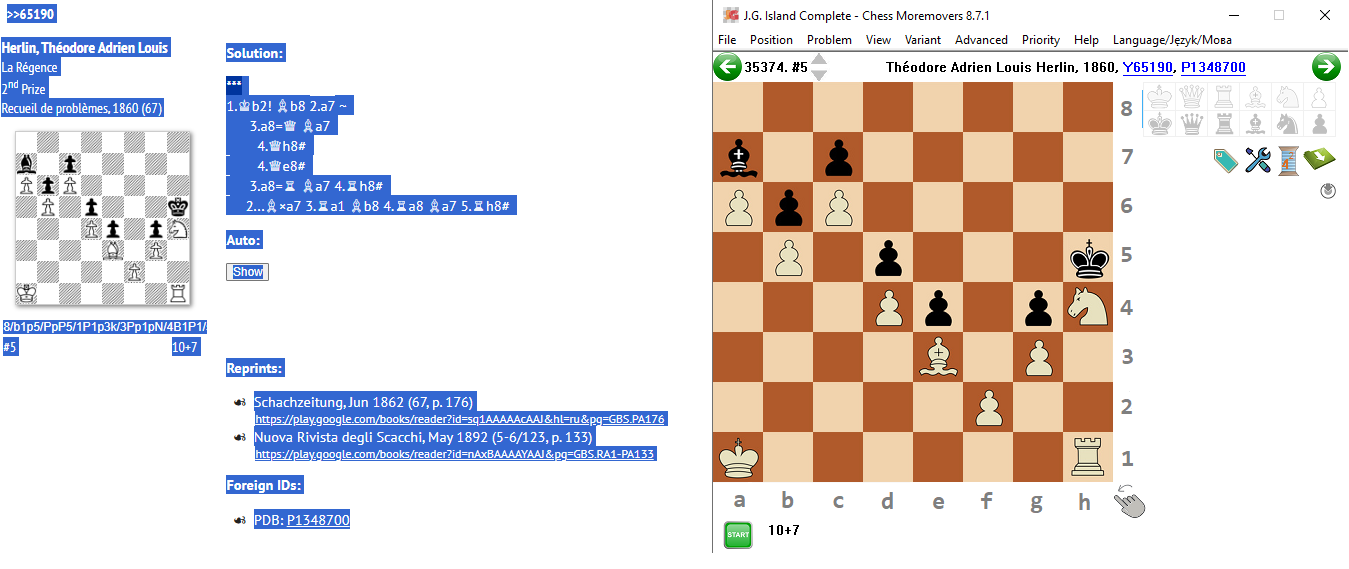
There is a small exception for Firefox and yacpdb: FEN code has to be copy-pasted separately from Firefox. BTW: fix for pdb in ver. 8.7.7
From ver. 8.7.12 there is an option for bulk paste (only #2-#6 with single solution and no short mate although there's an ini setting MaxStipulationForBulkInsert that can let override the default max. which is #6 - but then the operation may be very time consuming as it solves #n and #(n-1) brute force)
- Moves / long variants can also be copy-pasted into the program window: e.g. (for #5 8/b1p5/PpP5/1P1p3k/3Pp1pN/4B1P1/5P2/K6R) 1. Kb2! Lb8 2. a7 Lxa7 3. Ta1 Lb8 4. Ta8 La7 5. Th8#
(fix for German D/T/L letters in ver. 8.7.1; BTW: you can browse pdb database for FEN using option Position->Find position in PDB database)
- For positions with a small number of pieces (no more than 7) program displays a tab "Position details". It takes details either from a local file (Precalc folder; precise #n info) or from internet (Win/Draw/Loss Syzygy data).
When clicked, it displays details for all moves possible to make in a given positions (there are a few exceptions with n.a. - usually limited to cases of castling)
- Program window can be made "invisible" (no icon in toolbar either) i.e. minimized to notification area (system tray) by clicking Minimize button while keeping Ctrl key pressed (Windows only).
|